![3.2_logo_outlined_black.png]](https://help.shore.com/hs-fs/hubfs/3.2_logo_outlined_black.png?height=34&name=3.2_logo_outlined_black.png)
You can create additional users for the POS app in the POS Manager.
Note: In the Shore Kasse package, the number of users is limited to five; in the Kasse+ and All In One packages, it's unlimited.
Each employee can log in and check out as a user in the Shore POS App using their own PIN (lock code). The daily closing report (Z-report) and the revenue report then show how much revenue each user generated.
User Roles
By default, Shore POS has three different types of users:
Owner
- Unrestricted access rights that can't be taken away.
- The first user always belongs to this group.
Manager
- Unrestricted access rights.
Staff
- No access to margin, daily closing reports, or the cash book.
- Can't edit products or stock levels.
- Can't apply discounts.
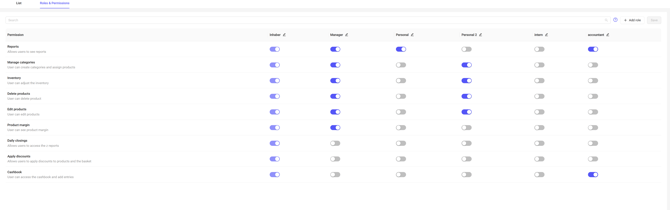
Customizing User Permissions
In the POS Manager, you can assign different access rights to users and create new user types. To do this, go to Settings > Users > Roles & Permissions. Here you can edit the permissions of the default roles or add new roles.